
Most SEO checklists are useless. They list 200 things you should do, give you no order to do them in, and leave you staring at a spreadsheet wondering where to start.
This one is different. It is the checklist we actually use when we audit a client site. Every item is something that moves rankings, and every item is ordered by impact. Fix the first section before you touch the last one.
This SEO checklist for 2026 covers technical SEO, on-page optimization, content, and off-page signals. Work through it in order and you will have a site that Google can crawl, understand, and rank. Whether you are doing this yourself or handing it to a team, the SEO checklist 2026 framework stays the same.
Technical SEO checklist
Technical SEO is the foundation of this SEO checklist 2026. If Google cannot crawl your site properly, nothing else matters.
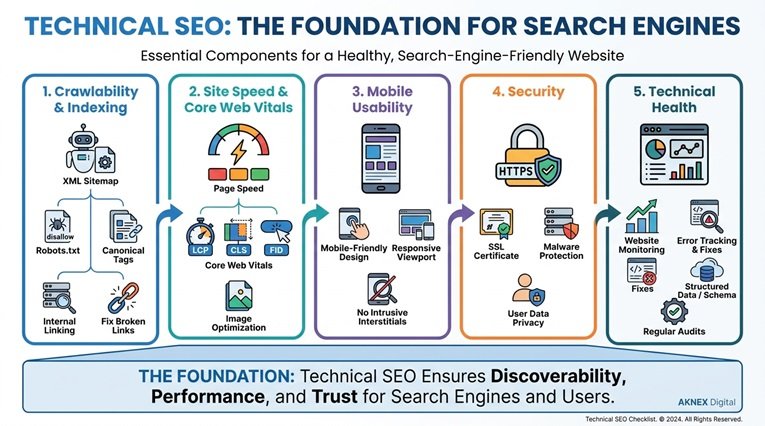
Crawlability and indexing
Start here. If search engines cannot find and read your pages, you do not have an SEO problem. You have a visibility problem.
Check your robots.txt file. It should live at yourdomain.com/robots.txt and it should not block your important pages. A single Disallow: / line accidentally left there will take your entire site out of the index.
Check your XML sitemap. It should list every page you want ranked, and it should be submitted in Google Search Console. If you are on WordPress, a plugin like Rank Math generates this automatically. If you are not, you need to build one manually or with a tool.
Check your canonical tags. Every page should have one, and it should point to the final version of that URL. Duplicate content splits your ranking signal across multiple URLs, and canonical tags tell Google which one counts.
Check for broken links. Use a tool like Screaming Frog or the free version of Ahrefs. Fix 404s with 301 redirects to the closest matching page. Do not redirect everything to the homepage. That confuses Google and wastes the link equity those URLs had.
Check your site in Google Search Console for crawl errors. Look for pages that return 404, 500, or redirect errors. Fix them in order of how much traffic they used to get. A page that used to bring in 500 visits a month is more urgent than one that never ranked.
Site speed and Core Web Vitals
Google measures three things for page experience. Largest Contentful Paint should be under 2.5 seconds. Interaction to Next Paint should be under 200 milliseconds. Cumulative Layout Shift should be under 0.1.
Run your homepage and your top five landing pages through PageSpeed Insights. It gives you a score and a list of specific fixes. Do not ignore the opportunities it lists. They are usually things like compressing images, removing render-blocking JavaScript, and enabling browser caching.
Compress your images. This is the single most common speed fix we find on client sites. Tools like ShortPixel or TinyPNG can cut image file sizes by 60 to 80 percent with no visible quality loss. If you are on WordPress, a plugin does this automatically on upload.
Enable a caching plugin. If you are on WordPress, WP Rocket or LiteSpeed Cache will handle this. If you are on another platform, check with your host. Server side caching is one of the biggest speed wins available.For custom backend systems, see our development samples
Minify your CSS and JavaScript. These files often contain unnecessary whitespace and comments that slow down page load. Most caching plugins handle this automatically, but it is worth checking. If your minification breaks your site, turn it off and fix the underlying issue instead.
Mobile usability
Google indexes the mobile version of your site first. If your site does not work on a phone, it does not rank.
Test your site on an actual phone. Not just in Chrome DevTools. Load your homepage, click your navigation, fill out your contact form. If anything is hard to tap, hard to read, or hard to complete, fix it.
Check your font sizes. Body text should be at least 16 pixels on mobile. Anything smaller forces readers to pinch and zoom, and they will leave instead.
Check your tap targets. Buttons and links should be at least 48 by 48 pixels. Anything smaller gets mis-tapped, and mis-taps create frustrated visitors who bounce.
Security
Install an SSL certificate. Your site should load over HTTPS, not HTTP. Google marks non-HTTPS sites as Not Secure in the address bar, and that label kills trust.
Keep your software updated. If you are on WordPress, update your core, themes, and plugins regularly. Most hacked sites we see are running outdated software with known vulnerabilities.
On-page SEO checklist
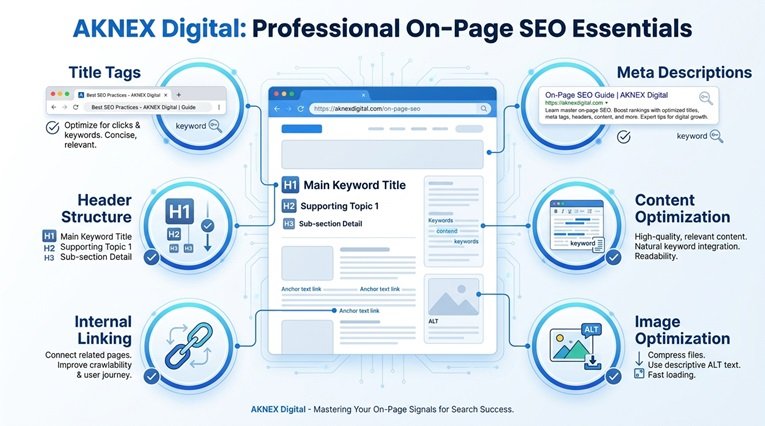
Once your technical foundation is solid, on-page SEO is where you tell Google what each page is about. This part of the SEO checklist 2026 covers the elements you control directly on each page.
Title tags and meta descriptions
Your title tag is the most important on-page ranking factor. It should be under 60 characters, include your primary keyword, and make someone want to click.
Write title tags that sell the click, not just the keyword. “SEO Services” is a title tag. “SEO Services That Rank You on Page One in 90 Days” is a title tag that gets clicked.
Your meta description does not directly affect rankings, but it affects click-through rate, and click-through rate affects rankings. Write 120 to 156 characters that include your keyword and a reason to click.
Header structure
Use one H1 per page. It should match or closely match your title tag.
Use H2s for main sections and H3s for subsections. Never skip a level. This helps Google understand your content structure and helps readers scan.
Content optimization
Include your primary keyword in the first 100 words. This tells Google what the page is about before it reads any further.
Use your keyword naturally throughout the content. Do not force it. If a sentence sounds weird with the keyword in it, rewrite the sentence.
Write for humans first. Google gets better at detecting keyword stuffing every year. If your content reads like it was written for a robot, it will not rank.
Use your keyword in at least one H2 subheading. This reinforces what the page is about without forcing it into every paragraph. A natural mention in a heading is worth more than five forced mentions in body text.
Internal linking
Link to at least three other pages on your site from every post. Use descriptive anchor text that tells the reader what they will find if they click.
Link from your new content to your old content. This spreads authority and helps Google discover your older pages.
Image optimization
Compress every image before you upload it. Use descriptive file names. A file named IMG_4032.jpg tells Google nothing. A file named seo-checklist-2026.jpg tells it exactly what the image is about.
Write alt text for every image. Describe what is in the image in plain language. Include your keyword only if it fits naturally.
Content SEO checklist
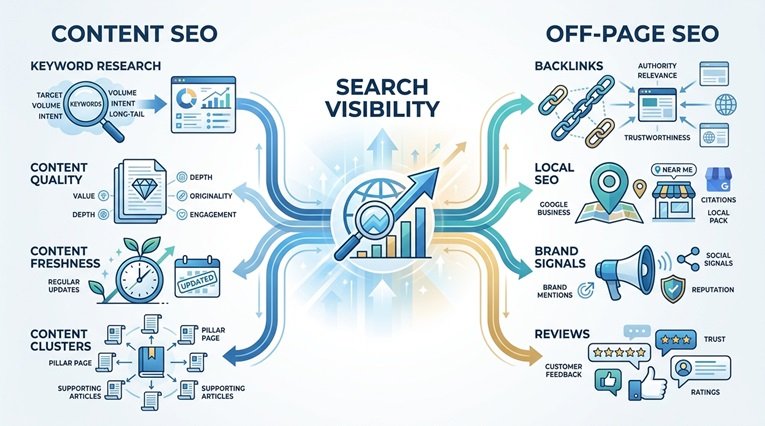
Content is what ranks. Technical SEO gets you indexed. Content gets you ranked.
Keyword research
Find keywords with real search volume. Use Ahrefs, SEMrush, or the free Google Keyword Planner. Look for terms with at least 100 monthly searches and a difficulty score you can realistically compete with.
Target long tail keywords. “SEO” is impossible to rank for. “SEO checklist for small business websites” is achievable and brings better traffic.
Content quality
Write content that answers the question completely. If someone reads your post and still has to Google the topic again, you failed.
Include original data, examples, and screenshots. See how AKNEX Digital approaches SEO, digital marketing, and technology for businesses. Content with original research gets shared and linked to.
Content freshness
Update your old posts. Google favors fresh content. If you published a post two years ago that is still ranking, update it with new information and republish it with a new date.
Create content clusters. Pick a broad topic like SEO and write a pillar post that covers everything. Then write supporting posts that each go deep on one subtopic. Link them all together. This structure signals to Google that you have real expertise on the subject.
Off-page SEO checklist
Off-page SEO is everything that happens outside your site that affects your rankings.
Backlink profile
Build links from relevant, authoritative sites. One link from a site in your industry is worth more than ten links from random directories.
Create linkable assets. Original research, comprehensive guides, and useful tools attract links naturally. Thin content does not.
Local SEO
Claim and optimize your Google Business Profile. Fill out every section. Add photos. Respond to reviews.
Get listed in relevant local directories. Make sure your name, address, and phone number are consistent everywhere.
Brand signals
Build your brand. Google looks at how often people search for your brand name, how often your brand is mentioned online, and how often people click your site in search results.
Encourage reviews on Google and other platforms. Reviews are a ranking factor for local search, and they build trust with potential customers. Make it easy for happy customers to leave a review by sending them a direct link.
Analytics and measurement
If you are not measuring, you are guessing.
Tracking setup
Install Google Analytics 4. Set up conversion tracking for your contact form, phone calls, and any other lead actions.
Install Google Search Console. Submit your sitemap. Check it monthly for crawl errors and manual actions.
Reporting
Track your rankings, traffic, and conversions monthly. Look for trends, not daily fluctuations. SEO is a long game.
Frequently asked questions
How often should I run an SEO checklist?
Run a full technical audit quarterly. Run an on-page audit every time you publish a new page. Check your rankings and traffic monthly.
What is the most important item on this checklist?
Technical SEO. If Google cannot crawl and index your site, nothing else matters. Fix your technical foundation first.
Can I do SEO myself or do I need an agency?
You can do a lot yourself if you have the time and willingness to learn. But if your time is worth more than what an agency costs, hire someone. The mistake most business owners make is trying to do it themselves badly instead of hiring someone to do it well. See our monthly marketing packages for options
How long does SEO take to work?
Three to six months for most competitive keywords. Less competitive keywords can rank in weeks. Highly competitive keywords can take a year or more.
Is this checklist good for ecommerce sites?
Yes, with additions. Ecommerce sites need product schema, category page optimization, and review markup on top of everything listed here.
Final thoughts
SEO is not complicated. It is just detailed. Most sites fail because they skip the basics and chase advanced tactics instead.
Work through this SEO checklist 2026 in order. Fix the technical issues first, then optimize your on-page elements, then build your content, then earn your links.
If you want help with any of it, we offer free consultations. No pressure, no obligation, just an honest conversation about what your site needs.
See our work that delivers results.
Pingback: Introducing AKNEX Digital | Marketing & Web Development